 simonchiang
7436bf6e2e
simonchiang
7436bf6e2e
C changes:
- gstorage.c: encode continent into root key for --persist --restore survival
- gholder.c: decode continent from root + lat/lng storage
- commons.h: add lat/lng fields to GMetrics struct
- geoip2.c/geoip1.h: extract coordinates from MMDB
- json.c: output lat/lng in geolocation JSON

JS changes:
- Remove cityIndex guard for static HTML city dots
- TopoJSON lat/lng fallback for city coordinates
- updateMap fallback city collection
- Dynamic orthographic center based on visitor count
- Mercator stays at [0,15] for full world view

Co-Authored-By: Claude <noreply@anthropic.com>
515 lines
20 KiB
Markdown
515 lines
20 KiB
Markdown
GoAccess [](https://github.com/allinurl/goaccess/actions/workflows/build-test.yml) [](https://goaccess.io)
|
|
========
|
|
|
|
## What is it? ##
|
|
GoAccess is an open source, real-time web log analyzer and interactive viewer
|
|
that runs in a terminal on *nix systems or directly in your browser. Designed
|
|
with system administrators, DevOps engineers, and security professionals in
|
|
mind, it delivers fast, actionable HTTP statistics and visual server reports on
|
|
the fly. GoAccess parses your web server logs in real time and presents the
|
|
data directly in the terminal or via a live HTML dashboard, making it easy to
|
|
monitor traffic, detect anomalies, and troubleshoot issues instantly.
|
|
|
|
More info at: [https://goaccess.io](https://goaccess.io/?src=gh).
|
|
|
|
[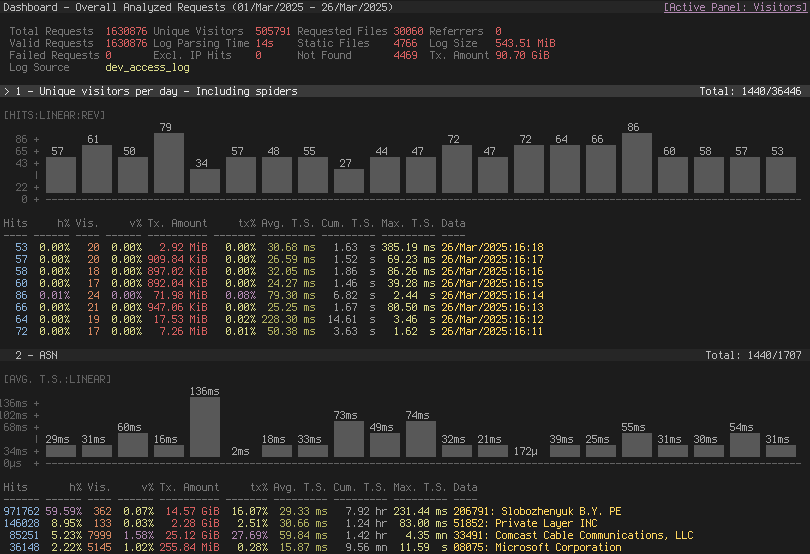](https://goaccess.io/)
|
|
[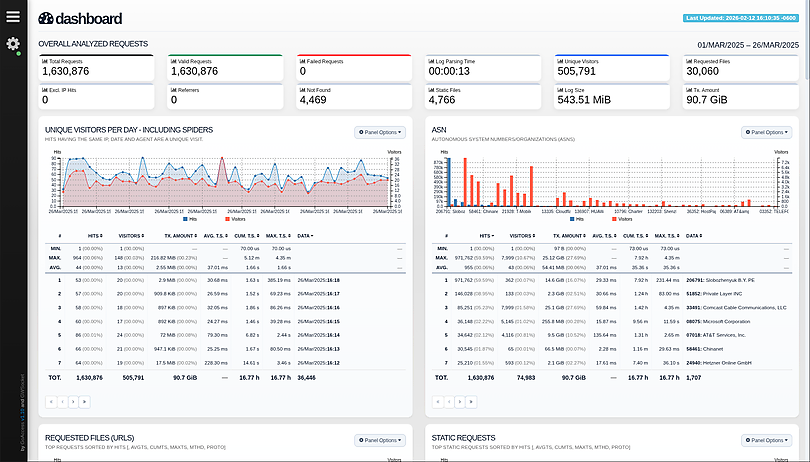](https://rt.goaccess.io/?src=gh)
|
|
|
|
## Features ##
|
|
GoAccess parses the specified web log file and outputs the data to the X
|
|
terminal. Features include:
|
|
|
|
* **Completely Real Time**<br>
|
|
All panels and metrics are timed to be updated every 200 ms on the terminal
|
|
output and every second on the HTML output.
|
|
|
|
* **Minimal Configuration needed**<br>
|
|
You can just run it against your access log file, pick the log format and let
|
|
GoAccess parse the access log and show you the stats.
|
|
|
|
* **Track Application Response Time**<br>
|
|
Track the time taken to serve the request. Extremely useful if you want to
|
|
track pages that are slowing down your site.
|
|
|
|
* **WebSocket Authentication:**<br>
|
|
GoAccess offers enhanced WebSocket authentication, supporting local and
|
|
external JWT verification, with secure token refresh capabilities and seamless
|
|
integration with external authentication systems.
|
|
|
|
* **Nearly All Web Log Formats**<br>
|
|
GoAccess allows any custom log format string. Predefined options include,
|
|
Apache, Nginx, Amazon S3, Elastic Load Balancing, CloudFront, etc.
|
|
|
|
* **Incremental Log Processing**<br>
|
|
Need data persistence? GoAccess has the ability to process logs incrementally
|
|
through the on-disk persistence options.
|
|
|
|
* **Only one dependency**<br>
|
|
GoAccess is written in C. To run it, you only need ncurses as a dependency.
|
|
That's it. It even features its own Web Socket server — http://gwsocket.io/.
|
|
|
|
* **Visitors**<br>
|
|
Determine the amount of hits, visitors, bandwidth, and metrics for slowest
|
|
running requests by the hour, or date.
|
|
|
|
* **Metrics per Virtual Host**<br>
|
|
Have multiple Virtual Hosts (Server Blocks)? It features a panel that
|
|
displays which virtual host is consuming most of the web server resources.
|
|
|
|
* **ASN (Autonomous System Number mapping)**<br>
|
|
Great for detecting malicious traffic patterns and block them accordingly.
|
|
|
|
* **Color Scheme Customizable**<br>
|
|
Tailor GoAccess to suit your own color taste/schemes. Either through the
|
|
terminal, or by simply applying the stylesheet on the HTML output.
|
|
|
|
* **Support for Large Datasets**<br>
|
|
GoAccess features the ability to parse large logs due to its optimized
|
|
in-memory hash tables. It has very good memory usage and pretty good
|
|
performance. This storage has support for on-disk persistence as well.
|
|
|
|
* **Docker Support**<br>
|
|
Ability to build GoAccess' Docker image from upstream. You can still fully
|
|
configure it, by using Volume mapping and editing `goaccess.conf`. See
|
|
[Docker](https://github.com/allinurl/goaccess#docker) section below.
|
|
There is also documentation how to use [docker-compose](./docker-compose/README.md).
|
|
|
|
### Nearly all web log formats... ###
|
|
GoAccess allows any custom log format string. Predefined options include, but
|
|
not limited to:
|
|
|
|
* Amazon CloudFront (Download Distribution).
|
|
* Amazon Simple Storage Service (S3)
|
|
* AWS Elastic Load Balancing
|
|
* Combined Log Format (XLF/ELF) Apache | Nginx
|
|
* Common Log Format (CLF) Apache
|
|
* Google Cloud Storage.
|
|
* Apache virtual hosts
|
|
* Squid Native Format.
|
|
* W3C format (IIS).
|
|
* Caddy's JSON Structured format.
|
|
* Traefik's CLF flavor
|
|
|
|
## Why GoAccess? ##
|
|
GoAccess was designed to be a fast, terminal-based log analyzer. Its core idea
|
|
is to quickly analyze and view web server statistics in real time without
|
|
needing to use your browser (_great if you want to do a quick analysis of your
|
|
access log via SSH, or if you simply love working in the terminal_).
|
|
|
|
It also serves as a practical tool for security monitoring, making it easy to
|
|
spot suspicious activity, unusual traffic patterns, brute-force attempts,
|
|
scanners, bots, and anomalous requests directly from your logs.
|
|
|
|
While the terminal output is the default output, it has the capability to
|
|
generate a complete, self-contained, real-time [**`HTML`**](https://rt.goaccess.io/?src=gh)
|
|
report, as well as a [**`JSON`**](https://goaccess.io/json?src=gh), and
|
|
[**`CSV`**](https://goaccess.io/goaccess_csv_report.csv?src=gh) report.
|
|
|
|
You can see it more of a monitor command tool than anything else.
|
|
|
|
## Installation ##
|
|
<a href="https://repology.org/project/goaccess/versions">
|
|
<img src="https://repology.org/badge/vertical-allrepos/goaccess.svg" alt="Packaging status" align="right">
|
|
</a>
|
|
|
|
### Build from release
|
|
|
|
GoAccess can be compiled and used on *nix systems.
|
|
|
|
Download, extract and compile GoAccess with:
|
|
|
|
$ wget https://tar.goaccess.io/goaccess-1.10.2.tar.gz
|
|
$ tar -xzvf goaccess-1.10.2.tar.gz
|
|
$ cd goaccess-1.10.2/
|
|
$ ./configure --enable-utf8 --enable-geoip=mmdb --with-zlib
|
|
$ make
|
|
# make install
|
|
|
|
### Build from GitHub (Development) ###
|
|
|
|
$ git clone https://github.com/allinurl/goaccess.git
|
|
$ cd goaccess
|
|
$ autoreconf -fiv
|
|
$ ./configure --enable-utf8 --enable-geoip=mmdb
|
|
$ make
|
|
# make install
|
|
|
|
### Distributions ###
|
|
|
|
It is easiest to install GoAccess on GNU+Linux using the preferred package manager
|
|
of your GNU+Linux distribution. Please note that not all distributions will have
|
|
the latest version of GoAccess available.
|
|
|
|
#### Debian/Ubuntu ####
|
|
|
|
# apt-get install goaccess
|
|
|
|
**Note:** It is likely this will install an outdated version of GoAccess. To
|
|
make sure that you're running the latest stable version of GoAccess see
|
|
alternative option below.
|
|
|
|
#### Official GoAccess Debian & Ubuntu repository ####
|
|
|
|
$ wget -O - https://deb.goaccess.io/gnugpg.key | gpg --dearmor | sudo tee /usr/share/keyrings/goaccess.gpg >/dev/null
|
|
$ echo "deb [signed-by=/usr/share/keyrings/goaccess.gpg arch=$(dpkg --print-architecture)] https://deb.goaccess.io/ $(lsb_release -cs) main" | sudo tee /etc/apt/sources.list.d/goaccess.list
|
|
$ sudo apt-get update
|
|
$ sudo apt-get install goaccess
|
|
|
|
**Note**:
|
|
* `.deb` packages in the official repo are available through HTTPS as well. You may need to install `apt-transport-https`.
|
|
|
|
#### Fedora ####
|
|
|
|
# yum install goaccess
|
|
|
|
#### Arch ####
|
|
|
|
# pacman -S goaccess
|
|
|
|
#### Gentoo ####
|
|
|
|
# emerge net-analyzer/goaccess
|
|
|
|
#### OS X / Homebrew ####
|
|
|
|
# brew install goaccess
|
|
|
|
#### FreeBSD ####
|
|
|
|
# cd /usr/ports/sysutils/goaccess/ && make install clean
|
|
# pkg install sysutils/goaccess
|
|
|
|
#### OpenBSD ####
|
|
|
|
# cd /usr/ports/www/goaccess && make install clean
|
|
# pkg_add goaccess
|
|
|
|
#### openSUSE ####
|
|
|
|
# zypper ar -f obs://server:http http
|
|
# zypper in goaccess
|
|
|
|
#### OpenIndiana ####
|
|
|
|
# pkg install goaccess
|
|
|
|
#### pkgsrc (NetBSD, Solaris, SmartOS, ...) ####
|
|
|
|
# pkgin install goaccess
|
|
|
|
#### Windows ####
|
|
|
|
GoAccess can be used in Windows through Cygwin. See Cygwin's <a
|
|
href="https://goaccess.io/faq#installation">packages</a>. Or through the
|
|
GNU+Linux Subsystem on Windows 10.
|
|
|
|
#### Docker ####
|
|
|
|
A Docker image has been updated, capable of directing output from an access log. If you only want to output a report, you can pipe a log from the external environment to a Docker-based process:
|
|
|
|
touch report.html
|
|
cat access.log | docker run --rm -i -v ./report.html:/report.html -e LANG=$LANG allinurl/goaccess -a -o report.html --log-format COMBINED -
|
|
|
|
OR real-time
|
|
|
|
tail -F access.log | docker run -p 7890:7890 --rm -i -e LANG=$LANG allinurl/goaccess -a -o report.html --log-format COMBINED --real-time-html -
|
|
|
|
There is also documentation how to use [docker-compose](./docker-compose/README.md).
|
|
|
|
##### Build in isolated container
|
|
|
|
You can also build the binary for Debian based systems in an isolated container environment to prevent cluttering your local system with the development libraries:
|
|
|
|
$ curl -L "https://github.com/allinurl/goaccess/archive/refs/heads/master.tar.gz" | tar -xz && cd goaccess-master
|
|
$ docker build -t goaccess/build.debian-12 -f Dockerfile.debian-12 .
|
|
$ docker run -i --rm -v $PWD:/goaccess goaccess/build.debian-12 > goaccess
|
|
|
|
You can read more about using the docker image in [DOCKER.md](https://github.com/allinurl/goaccess/blob/master/DOCKER.md).
|
|
|
|
#### Distribution Packages ####
|
|
|
|
GoAccess has minimal requirements, it's written in C and requires only ncurses.
|
|
However, below is a table of some optional dependencies in some distros to
|
|
build GoAccess from source.
|
|
|
|
| Distro | NCurses | GeoIP (opt) | GeoIP2 (opt) | OpenSSL (opt) |
|
|
| ---------------------- | ---------------- | ---------------- | --------------------- | -------------------|
|
|
| **Ubuntu/Debian** | libncurses-dev | libgeoip-dev | libmaxminddb-dev | libssl-dev |
|
|
| **RHEL/CentOS** | ncurses-devel | geoip-devel | libmaxminddb-devel | openssl-devel |
|
|
| **Arch** | ncurses | geoip | libmaxminddb | openssl |
|
|
| **Gentoo** | sys-libs/ncurses | dev-libs/geoip | dev-libs/libmaxminddb | dev-libs/openssl |
|
|
| **Slackware** | ncurses | GeoIP | libmaxminddb | openssl |
|
|
|
|
**Note**: You may need to install build tools like `gcc`, `autoconf`,
|
|
`gettext`, `autopoint` etc. for compiling/building software from source. e.g.,
|
|
`base-devel`, `build-essential`, `"Development Tools"`.
|
|
|
|
## Storage ##
|
|
|
|
#### Default Hash Tables ####
|
|
|
|
In-memory storage provides better performance at the cost of limiting the
|
|
dataset size to the amount of available physical memory. GoAccess uses
|
|
in-memory hash tables. It has very good memory usage and pretty good
|
|
performance. This storage has support for on-disk persistence as well.
|
|
|
|
## Command Line / Config Options ##
|
|
See [**options**](https://goaccess.io/man#options) that can be supplied to the command or
|
|
specified in the configuration file. If specified in the configuration file, long
|
|
options need to be used without prepending `--`.
|
|
|
|
## Usage / Examples ##
|
|
**Note**: Piping data into GoAccess won't prompt a log/date/time
|
|
configuration dialog, you will need to previously define it in your
|
|
configuration file or in the command line.
|
|
|
|
### Getting Started ###
|
|
|
|
To output to a terminal and generate an interactive report:
|
|
|
|
# goaccess access.log
|
|
|
|
To generate an HTML report:
|
|
|
|
# goaccess access.log -a > report.html
|
|
|
|
To generate a JSON report file:
|
|
|
|
# goaccess access.log -a -d -o report.json
|
|
|
|
To generate a CSV report to stdout:
|
|
|
|
# goaccess access.log --no-csv-summary -o csv
|
|
|
|
GoAccess also allows great flexibility for real-time filtering and parsing. For
|
|
instance, to quickly diagnose issues by monitoring logs since goaccess was
|
|
started:
|
|
|
|
# tail -f access.log | goaccess -
|
|
|
|
And even better, to filter while maintaining opened a pipe to preserve
|
|
real-time analysis, we can make use of `tail -f` and a matching pattern tool
|
|
such as `grep`, `awk`, `sed`, etc.:
|
|
|
|
# tail -f access.log | grep -i --line-buffered 'firefox' | goaccess --log-format=COMBINED -
|
|
|
|
or to parse from the beginning of the file while maintaining the pipe opened
|
|
and applying a filter
|
|
|
|
# tail -f -n +0 access.log | grep -i --line-buffered 'firefox' | goaccess -o report.html --real-time-html -
|
|
|
|
|
|
### Multiple Log files ###
|
|
|
|
There are several ways to parse multiple logs with GoAccess. The simplest is to
|
|
pass multiple log files to the command line:
|
|
|
|
# goaccess access.log access.log.1
|
|
|
|
It's even possible to parse files from a pipe while reading regular files:
|
|
|
|
# cat access.log.2 | goaccess access.log access.log.1 -
|
|
|
|
**Note**: the single dash is appended to the command line to let GoAccess
|
|
know that it should read from the pipe.
|
|
|
|
Now if we want to add more flexibility to GoAccess, we can use `zcat --force`
|
|
to read compressed and uncompressed files. For instance, if we would
|
|
like to process all log files `access.log*`, we can do:
|
|
|
|
# zcat --force access.log* | goaccess -
|
|
|
|
_Note_: On Mac OS X, use `gunzip -c` instead of `zcat`.
|
|
|
|
### Multi-thread Support ###
|
|
|
|
Use `--jobs=<count>` (or `-j`) to enable multi-thread parsing. For example:
|
|
|
|
# goaccess access.log -o report.html -j 4
|
|
|
|
|
|
And use `--chunk-size=<256-32768>` to adjust chunk size, the default chunk size is 1024. For example:
|
|
|
|
# goaccess access.log -o report.html -j 4 --chunk-size=8192
|
|
|
|
|
|
### Real-time HTML outputs ###
|
|
|
|
GoAccess has the ability the output real-time data in the HTML report. You can
|
|
even email the HTML file since it is composed of a single file with no external
|
|
file dependencies, how neat is that!
|
|
|
|
The process of generating a real-time HTML report is very similar to the
|
|
process of creating a static report. Only `--real-time-html` is needed to make
|
|
it real-time.
|
|
|
|
# goaccess access.log -o /usr/share/nginx/html/your_site/report.html --real-time-html
|
|
|
|
To view the report you can navigate to `http://your_site/report.html`.
|
|
|
|
By default, GoAccess will use the host name of the generated report.
|
|
Optionally, you can specify the URL to which the client's browser will connect
|
|
to. See [FAQ](https://goaccess.io/faq) for a more detailed example.
|
|
|
|
# goaccess access.log -o report.html --real-time-html --ws-url=goaccess.io
|
|
|
|
By default, GoAccess listens on port 7890, to use a different port other than
|
|
7890, you can specify it as (make sure the port is opened):
|
|
|
|
# goaccess access.log -o report.html --real-time-html --port=9870
|
|
|
|
And to bind the WebSocket server to a different address other than 0.0.0.0, you
|
|
can specify it as:
|
|
|
|
# goaccess access.log -o report.html --real-time-html --addr=127.0.0.1
|
|
|
|
**Note**: To output real time data over a TLS/SSL connection, you need to use
|
|
`--ssl-cert=<cert.crt>` and `--ssl-key=<priv.key>`.
|
|
|
|
### Filtering ###
|
|
|
|
#### Working with dates ####
|
|
|
|
Another useful pipe would be filtering dates out of the web log
|
|
|
|
The following will get all HTTP requests starting on `05/Dec/2010` until the
|
|
end of the file.
|
|
|
|
# sed -n '/05\/Dec\/2010/,$ p' access.log | goaccess -a -
|
|
|
|
or using relative dates such as yesterdays or tomorrows day:
|
|
|
|
# sed -n '/'$(date '+%d\/%b\/%Y' -d '1 week ago')'/,$ p' access.log | goaccess -a -
|
|
|
|
If we want to parse only a certain time-frame from DATE a to DATE b, we can do:
|
|
|
|
# sed -n '/5\/Nov\/2010/,/5\/Dec\/2010/ p' access.log | goaccess -a -
|
|
|
|
If we want to preserve only certain amount of data and recycle storage, we can
|
|
keep only a certain number of days. For instance to keep & show the last 5
|
|
days:
|
|
|
|
# goaccess access.log --keep-last=5
|
|
|
|
#### Virtual hosts ####
|
|
|
|
Assuming your log contains the virtual host field. For instance:
|
|
|
|
vhost.io:80 8.8.4.4 - - [02/Mar/2016:08:14:04 -0600] "GET /shop HTTP/1.1" 200 615 "-" "Googlebot-Image/1.0"
|
|
|
|
And you would like to append the virtual host to the request in order to see
|
|
which virtual host the top urls belong to:
|
|
|
|
awk '$8=$1$8' access.log | goaccess -a -
|
|
|
|
To do the same, but also use real-time filtering and parsing:
|
|
|
|
tail -f access.log | unbuffer -p awk '$8=$1$8' | goaccess -a -
|
|
|
|
To exclude a list of virtual hosts you can do the following:
|
|
|
|
# grep -v "`cat exclude_vhost_list_file`" vhost_access.log | goaccess -
|
|
|
|
#### Files, status codes and bots ####
|
|
|
|
To parse specific pages, e.g., page views, `html`, `htm`, `php`, etc. within a
|
|
request:
|
|
|
|
# awk '$7~/\.html|\.htm|\.php/' access.log | goaccess -
|
|
|
|
Note, `$7` is the request field for the common and combined log format,
|
|
(without Virtual Host), if your log includes Virtual Host, then you probably
|
|
want to use `$8` instead. It's best to check which field you are shooting for,
|
|
e.g.:
|
|
|
|
# tail -10 access.log | awk '{print $8}'
|
|
|
|
Or to parse a specific status code, e.g., 500 (Internal Server Error):
|
|
|
|
# awk '$9~/500/' access.log | goaccess -
|
|
|
|
Or multiple status codes, e.g., all 3xx and 5xx:
|
|
|
|
# tail -f -n +0 access.log | awk '$9~/3[0-9]{2}|5[0-9]{2}/' | goaccess -o out.html -
|
|
|
|
And to get an estimated overview of how many bots (crawlers) are hitting your server:
|
|
|
|
# tail -F -n +0 access.log | grep -i --line-buffered 'bot' | goaccess -
|
|
|
|
### Tips ###
|
|
|
|
Also, it is worth pointing out that if we want to run GoAccess at lower
|
|
priority, we can run it as:
|
|
|
|
# nice -n 19 goaccess -f access.log -a
|
|
|
|
and if you don't want to install it on your server, you can still run it from
|
|
your local machine!
|
|
|
|
# ssh -n root@server 'tail -f /var/log/apache2/access.log' | goaccess - --log-format=COMBINED
|
|
|
|
**Note:** SSH requires `-n` so GoAccess can read from stdin. Also, make sure to
|
|
use SSH keys for authentication as it won't work if a passphrase is required.
|
|
|
|
#### Troubleshooting ####
|
|
|
|
We receive many questions and issues that have been answered previously.
|
|
|
|
* Date/time matching problems? Check that your log format and the system locale in which you run GoAccess match. See [#1571](https://github.com/allinurl/goaccess/issues/1571#issuecomment-543186858)
|
|
* Problems with pattern matching? Spaces are often a problem, see for instance [#136](https://github.com/allinurl/goaccess/issues/136), [#1579](https://github.com/allinurl/goaccess/issues/1579)
|
|
* Other issues matching log entries: See [>200 closed issues regarding log/date/time formats](https://github.com/allinurl/goaccess/issues?q=is%3Aissue+is%3Aclosed+label%3A%22log%2Fdate%2Ftime+format%22)
|
|
* Problems with log processing? See [>111 issues regarding log processing](https://github.com/allinurl/goaccess/issues?q=is%3Aissue+is%3Aclosed+label%3Alog-processing)
|
|
|
|
|
|
#### Incremental log processing ####
|
|
|
|
GoAccess has the ability to process logs incrementally through its internal
|
|
storage and dump its data to disk. It works in the following way:
|
|
|
|
1. A dataset must be persisted first with `--persist`, then the same dataset
|
|
can be loaded with.
|
|
2. `--restore`. If new data is passed (piped or through a log file), it will
|
|
append it to the original dataset.
|
|
|
|
##### NOTES #####
|
|
|
|
GoAccess keeps track of inodes of all the files processed (assuming files will
|
|
stay on the same partition), in addition, it extracts a snippet of data from
|
|
the log along with the last line parsed of each file and the timestamp of the
|
|
last line parsed. e.g., `inode:29627417|line:20012|ts:20171231235059`
|
|
|
|
First, it compares if the snippet matches the log being parsed, if it does, it
|
|
assumes the log hasn't changed drastically, e.g., hasn't been truncated. If
|
|
the inode does not match the current file, it parses all lines. If the current
|
|
file matches the inode, it then reads the remaining lines and updates the count
|
|
of lines parsed and the timestamp. As an extra precaution, it won't parse log
|
|
lines with a timestamp ≤ than the one stored.
|
|
|
|
Piped data works based off the timestamp of the last line read. For instance,
|
|
it will parse and discard all incoming entries until it finds a timestamp >=
|
|
than the one stored.
|
|
|
|
##### Examples #####
|
|
|
|
// last month access log
|
|
# goaccess access.log.1 --persist
|
|
|
|
then, load it with
|
|
|
|
// append this month access log, and preserve new data
|
|
# goaccess access.log --restore --persist
|
|
|
|
To read persisted data only (without parsing new data)
|
|
|
|
# goaccess --restore
|
|
|
|
## Contributing ##
|
|
|
|
Any help on GoAccess is welcome. The most helpful way is to try it out and give
|
|
feedback. Feel free to use the GitHub issue tracker and pull requests to
|
|
discuss and submit code changes.
|
|
|
|
You can contribute to our translations by editing the .po files direct on GitHub or using the visual interface [inlang.com](https://inlang.com/editor/github.com/allinurl/goaccess)
|
|
|
|
Enjoy!
|